Wednesday, December 16, 2020

Christmas Cards

 Every year, I want to send Christmas cards. The thought of postage though... it's like 80cents a card here. Adds up! Then on Facebook, I found out that the student leadership group at the high school where my kids go/went, was having a challenge to make Christmas cards for local seniors in senior residences. Students could get volunteer hours. Well, sign me up! Okay, sign up Megan. I started googling easy Christmas cards. I had trouble getting started, so I went into Design Space and found some free images and got cutting, figuring that Megan could make watercolour backgrounds, or even plain backgrounds. 

I had some glitter vinyl from Dollarama and cut snowflakes. I had a lot of trouble trying to get the settings right. Sometimes it cut all the way through, but more often it wouldn't cut deep enough. 

After making the house and the gingerbread girl, I wanted to do more with pens! I made some in simple rectangles, and some I did a little more with making a nice shape to cut out. I didn't really know at this point what size the cards would be though. 

I went to Michaels and got some Christmas paper pads. One was solid colour papers with embossed designs. It was nice and simple though some of the colours were a little strange. We got the table cleared off on a rainy/snowy Sunday and got to work

I cut the tree shapes, and Megan watercoloured them, and strips for for the sky.

This is upside down actually. The turquoise strip was left over after cutting out snowflakes. It was the perfect size for the card. The silver is very sparkly vinyl film from Dollarama. The card of the left, that's a free image in Design Space. It's #M47422. No Cricut Access needed. This one was cut out of the silver vinyl and stuck down to black card. That was not easy though. More ideas with it later

Megan took this paper that is embossed with birch trees, and cut the leaves out of a printed page with a full page design. She used fancy edge scissors to make the snow. She also put some snowflakes inside.

This snowflake is a two layer free design in Design Space. For the banner, I made a rectangle, then a triangle. Duplicate the triangle. Line them up over the ends of the rectangle and slice it out. Then a simple font for Happy Holidays. The tiny silver snowflake in the centre of the big one is from the snowflake panel card that was cut in the foil. When you weed it out, there are three tiny snowflakes that come out

I found the Christmas tree in Design Space, again, a free design. It's in three pieces, so it's easy to make the top star in a glitter. I used all sorts of green cardstock, and some of the green embossed papers. The snowflake was a free snowflake. I took a rectangle, centered it, and welded it to the snowflake. Then used a simple free text. I don't mind the "bubble letters". Sometimes I colour them in with the same colour, or with a contrasting colour. The Merry Christmas was made by welding a bunch of ovals together. The pointsetta I'll mention below.
Look how glittery this snowflake is, cut from the Dollarama vinyl. I found that sticking the vinyl to cardstock really worked the best over all. Trying to stick down the vinyl, with it's flimsy floppy snowflake arms, nice and tidy and straight...was hard. So, stick the vinyl to cardstock and run that through the Cricut.

There were lots of scraps of green paper. I took the same tree as earlier, and contoured out the trunk and star. Then I made a small rectangle, and an oval. I placed the oval at the bottom of the rectangle, then welded. Then welded that to the tree. Now it cut the trunk out with the tree.

I looked at cards I had, and Googled ideas. I downloaded a couple Christmasy fonts. And tried what should have been a simple task of writing text, and attaching it to a shape.


Design Space did an update and the whole Cricut world fell apart. Items couldn't be welded or attached properly. They couldn't get moved on the cut preview screens. It froze up. Then, add in my own True Tracy Way of doing things, and forgetting to change the paper size once I finally got it going...And then...Cricut decided to print over top of what it already printed...

Lots and lots of snowflakes! I have a large envelope full of leftovers.

The bottom left was the snowflake panel glued onto very glittery light teal cardstock. I love it! The top right one I really had to put on my thinking cap. I wanted it cut out of the card itself. I tried slice, but that wasn't right. Eventually, I realized I had to slice out a square from the card base piece (most were 7x10" so folded in half, they were 5x7") and then WELD the snowflakes to the cardbase inside the cutout square. Make sure to leave enough border between the cut out and the fold as it's pretty delicate. If you have a scoring wheel, that would make it easier to fold. I used turquoise cardstock, then a shiny silver cardstock from a little pad I got in the Christmas craft section at Dollarama.

I wish you could see how it glitters! This is a high impact card without a lot of work or materials. My favourite type of project!

More of the trees. Some were from the papers embossed with wintery designs. I wish my pictures were better but November/December is hard for taking pictures in my house. That pentagon on the bottom right was fun. To get the card shape, I made a pentagon and duplicated it. Then I flipped one upside down, and overlapped the point a bit, equally on both pentagons, then welded the two together. One card was made by slicing the tree out of the card base and putting tissue paper behind.
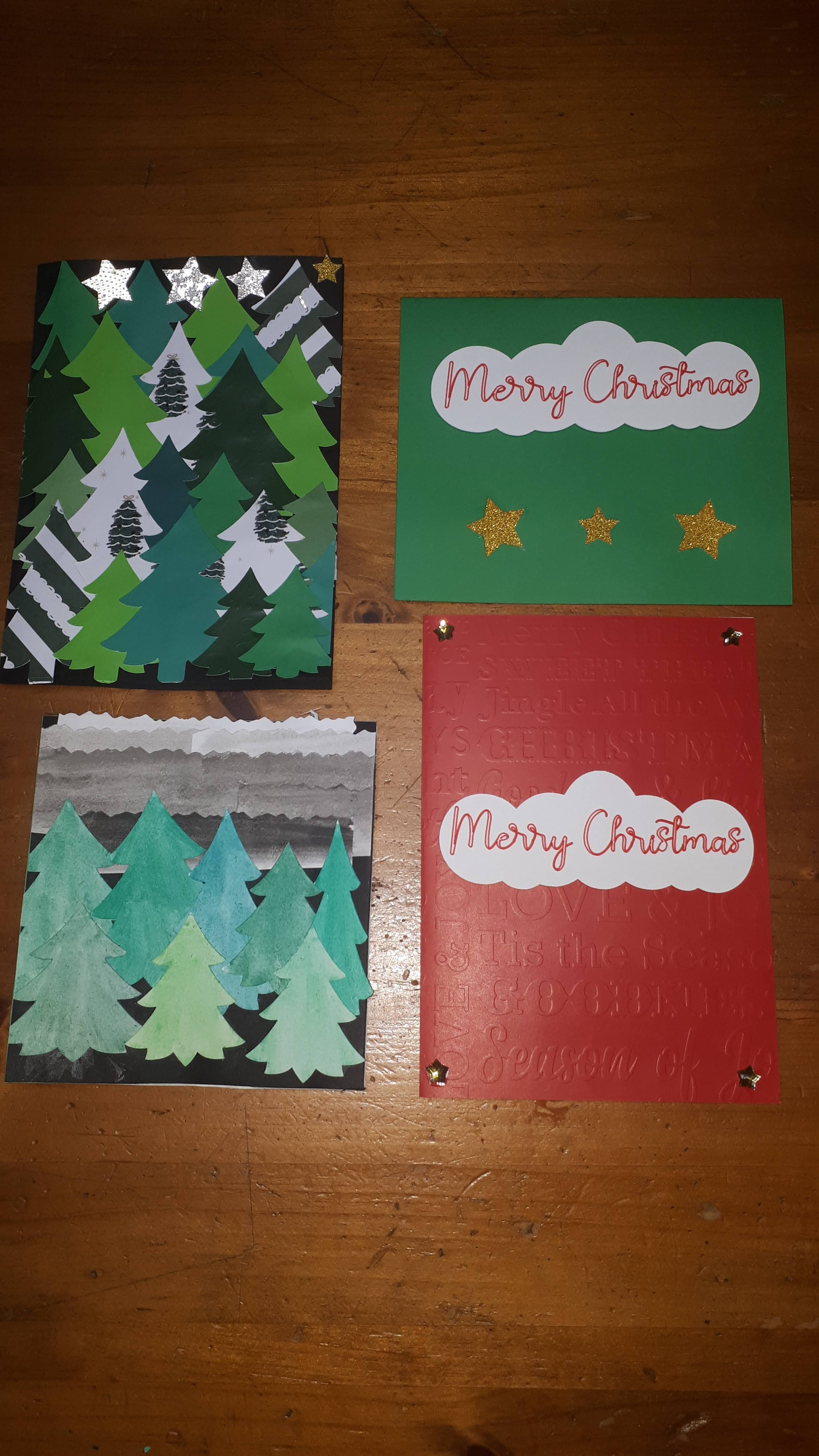
Some really basic cards, and some fancier ones. The embossed paper was nice in real life but hard to see in the pictures. 

The pointsetta design is free, from Pocket Wonders.   The two right ones were cut out of cardstock, the veins added by hand, and glued to the embossed paper bases. The hexagon one, I made a hexagon, duplicated it, put them side by side, then welded. Then I took the larger layer of the pointsetta leaves, and sliced it out of one side of the hexagon. I put red tissue paper behind, and drew on some veins.

The top card is a free project from Handmade in the Heartland. I used the embossed paper for the cardbase and forgot to set it for heavier paper and it didn't cut clean. Then I had issues when gluing, and well, there's a bit of shadowing look to the card. It's a nice card if you're a little better than me with glue. The bottom one took that Merry Christmas part that got weeded out, and I just stuck it to paper and cut around it.

These cards are from Shirley's Templates.  I'm not going to link to each one. My suggestion is to click on each year in the sidebar on the right, then scroll backwards till about Sept of that year. Do this for each year. She has a TON of free Christmas card designs. The top one says "Christmas Greetings". I thought it would show up okay in that striped cardstock, but it didn't, so I coloured in the white parts of the letters. It's better but not my favourite. I did add some little star plastic flat beads to the stars. Flat beads is not the right name. Like, shaped rhinestones, except they're from Dollarama. They have these little Christmas card making kits with sequins, beads, snowflakes, etc. 
The bottom card has the background cut from dark teal glitter. The "Merry Christmas" are on foam tabs. We weren't thrilled with how it looks off balanced. Merry should be at the top with two snowflakes. You can't just do that though because there is a white blob under where Merry goes. 

This is the middle one from above (I linked it). I LOVE it. the circle background is a fine silver glitter paper from Dollarama's tiny pad of gold and silver glitter and foil paper. In the very center I did add a silver snowflake from the cardmaking kit and a bigger white snowflake. It's a delicate card to cut out, but worth it! If you download any from her blog, be careful what you click on. You want the blue rectangle in the Media Fire box at the top right. Not any of the "download" buttons over on the left. 

I believe the top one is also a Shirley card. I used the weeded out bits to fancy up the other cards. Behind the Merry Christmas panel, I used sparkly gold foil vinyl from Dollarama, stuck to cardstock. It practically glows when the light hits it.

We did have to send a thank you card to someone, and the girls picked the Merry Christmas card but wanted a shadow layer added. I did that in Inkscape. I messed up the sizing on the first two tries, but this one is very lovely, with silver foil. It's amazing what adding just a little offset layer does to a project. I don't understand why Design Space doesn't have that feature. I also don't know why Blogger doesn't let you edit the photos within the page. 

We ended up contributing 30 cards! I hope to get started earlier next year (like...maybe next week?). I have lots of bits left over, and will of course look for marked down materials in the new year. The only cost for these was materials. I never thought I could do this when I first bought the Maker and everything I found was so not my style. I already have designs lined up for next year!!


Tuesday, December 15, 2020

You Can't Catch Me!

 It was feeling like every time I turned around, Gjoa at Special Heart Studio had another awesome design I wanted to do. Let alone trying to do ones from before I even got the Cricut, I couldn't keep up with her current designs! This one was no exception! I knew I needed it from the moment I saw it!

I made a special trip into Michaels' to get brown cardstock. Amazingly, they had a variety pack of brown! However, despite the two dark colours looking different in the package, they were really similar once cut out.

I thought about maybe doing the back in black instead, but someone mentioned burnt cookies... I really wanted to get some textured or glittery papers to make more (but sadly, have not).

As soon as I saw these guys on her website, I knew I wanted to see if I could alter it so it looked like a bite was taken out. My friend Cherie, owns a great boutique, Beadle, and years ago sold adorable felt gingerbread men with a nibble from their arm/feet. They were so cute, I wanted paper versions. 

It took some figuring out, but I managed to do it!! I couldn't just cut off chunks from the arm. There is a border on the pieces to give a smooth edge. 

I did a different combination of papers this time. He's more subtle. I like them all! The girl one came with the original file. It was a great reason to buy some more pens that would work in the Cricut. I bought Staedtler Triplus Fineliners at Wal-Mart. Of course, I'm seeing them cheaper and in bigger sets, everywhere now that it's closer to Christmas. I did have to wrap painter's tape around the pen to get it to stay in the clamp. And, apparently I missed the step about attaching the draw layer to the piece it draws on to. 

Look at the detail These guys have only two layers with the overall design, but it's enough to be really effective.

I still smile every time I see this! LOL! He's so cute!

Look at that nibble! Poor guy! LOL! Changing the smile to a frown would have been too much with this file, but I think he's fine with a smile. I'm so glad I got these done early. I wanted to do more, but I just haven't had time. There's always something new to make!!


Crafty Hallowe'en

 I don't normally do a lot for Hallowe'en. I do really enjoy it, but the weather starts to get crappy here around then and I've never done any crafting for it. We don't have a party or anything, so why bother? I have made pumpkin hats and costumes in the past though.

But now that I have the Cricut, I knew I had to do some creating! All of a sudden, I started seeing layered pumpkin projects, and other projects! My favourites again, were from Special Heart Studio!

This adorable "peach" was removed from the top layer!

I kind of felt this yellow layer was a little too bright. However, something weird happened with my Cricut, and when I cut the bottom green layer, it cut another top layer!

It was an interesting look. Not quite what I wanted, so I put my last sheet of green in and tried to cut another bottom layer.

Something messed up again! When I looked at the computer, it was showing both mats as being cut at the same time! Now I had TWO green top layers!

I snipped apart one of the green top layers and added a few green accents. Also cut the center piece in another shade of orange to reduce the amount of yellow showing. For the leaf, I used the contour function and made a solid leaf, cut in another shade of green.

I found some orange rick rack in my sewing desk, stuck a 3M Command hook on my front door, and Bam! Hallowe'en 2020 taken care of. 

But what to do with the green piece left over? It reminded me of an acorn squash--a favourite fall veggie growing up. I thought I had lots of green paper, but no. Needed another trip to Michaels. This time I cut the thin piece representing the crevices in orange. You know how squash get a bit of orange on them. It was too bright, so I found my only stamping inkpad left, which just happened to be green, and toned it down a bit. 

Rob and I made a surprise visit to my mom's on Thanksgiving (October here) and I gave it to her for her front door. A little unconventional, but I think it was adorable. 


Monday, December 14, 2020

Perfect New House Gift

 Right when I was working on the letters from the previous post,  Special Heart Studio came out with another awesome project I HAD to make. What perfect timing!

Whenever I take a paper project off the mat, I always admire the leftover bits. Sometimes there are shapes that are worth keeping but not really this time.


I messed up the colours of the layers again, but it's okay. This was the first time using the Cricut pen since the original test project. I was really impressed and this prompted me to do more "Draw" projects.

Simple and sweet, a perfect little housewarming gift. One group member showed that in the heart, she had done a sketch of a house (for other new homeowners). I was going to do that but didn't have a picture of their house. 

I can't recommend Special Heart Studio's projects enough. She has so many designs! And they're all free. I have been learning how to design this type of project now, rather than just the letters that I had done. It's not terribly hard, though of course, I can always make it harder than it needs to be LOL.


Layered Letters

 I had surgery last week, so I'm on couch-rest and getting caught up with blogging. Lots to show in the Cricut area of my life!

My brother and his partner finally bought their first house. Like many in their 30s, they struggled in the inflated housing market of southern Ontario. COVID was actually a blessing for them--with my SIL working from home, they were saving on commuting costs (and no more lunch time distractions in the big city LOL). On top of that, they were able to find a fixer-upper in the countryside that had the renos stopped because the owners were out of money due to COVID. It was exactly what they were looking for (although I'm sure my brother would have liked a bigger garage/workshop!). 

They were going to be renovating, so they didn't really have a colour scheme or styling in mind yet. I thought I would make these in shades of grey, since that's the hot colour in home decor, but I didn't like the pack of assorted grey paper. Megan felt these beachy colours were subtle and modern

I used the Zengo font again, and Inkscape. I am definitely getting better at this, though I was in a bit of a rush and I didn't smooth out some of the areas of the outline. 

I was having trouble keeping the layers flat. A letter like this is not an easy one to start with, and I have developed some tips to make it easier. Stay tuned for that post.

You can see how the inside curve of the C is not smooth. I also had trouble at the top of the C, getting the gold flat. The gold cardstock feels thicker, even though it was in the package with the rest (Recollections brand, one of their theme packs).


Another shot of those bumpy edges. 

I had trouble gluing the gold. Trying to re-align it caused creasing. I didn't use foam tabs for the gold layer, I used spray glue.


For the "&" I used a font I had already that had a bit of design to it instead of a solid character. Then I made a couple offset layers. I didn't add the gold layer (read on to find out why). I hadn't intended to have the pale blue as the top layer, but well, these things happen. I made the easels from the incredible website, Special Heart Studio. You'll be seeing more designs from Gjoa here! She really inspires me! The easel fit the M and the & well, but not the C. I made a few adjustments and it's better, but not as good as I'd like. I did the easels because I didn't want to invest in frames that they might not like. Cheryl says she'll probably frame them once they're done renovating. 

And now. It wouldn't be a TracyKM project, without an issue, the True Tracy Way. And boy, did I have an issue. I cut the layers of the C first, then went on to the M. I don't remember what order they were being cut in, but on the gold layer, the Maker SHUT DOWN MID-CUT. Yes. OMG. It powered off, blade down in the cardstock. It would not turn on again! The power cord had power. An error message appeared, it didn't help. I Googled, I YouTubed, I silently wept. Searched the Cricut FAQs and Troubleshooting. Finally another error message showed up and I followed the link. 

Apparently, using foil cardstock can cause static if the air is too dry, and the machine stops!!!!!!! 

The fix is to mist the air around the machine. Done. And... still no go. 

This was on a Friday night. I sent a message off to Cricut. And turned off the lights and left the room.

On Monday, I thought, let's just try again. I misted again, and pressed power. And it came to life! I had previously yanked the mat out so I worried about the rollers, but it seemed fine. I cut the gold layer again, said a silent blessing and got to assembling.

Last week in a Facebook Cricut group, a member posted that they were having trouble with their machine just shutting off mid cut and Cricut wasn't listening to them and helping.  I noticed it looked like foil cardstock. I shared my experience, and indeed, that was what was happening. She had even told the Cricut agent that it was foil cardstock! I wonder how many other times this happens!! 


Keeping it Bright

 After finishing the last bright blanket, I got going on the next. I kept it simple (I thought...the True Tracy Way). I was going to do plain old stockinette, with garter stitch borders. Simple.

Then. Pooling. Added a second strand to try to break it up. Then a third...

These pictures were to show how blocking can make acrylic yarns look better. The spots where I was carrying yarn up a row, or over a few stitches, needed some smoothing.

I knew I would probably not have enough yarn, based on the last neon blanket I made. I had hoped 5 stitch borders instead of 4 stitches would help. Yeah, not enough. 


So on the two short ends, I picked up from the cast on/off row, and worked a garter stitch border outwards. I used the leftover yarn from the previous blanket, which had very similar colours but much longer colour runs.


Above, and below, show the blanket after blocking. In this case, blocking was machine washing and drying, then steaming with an iron. It really helps it smooth out.


The colours on the second end are a bit shorter because I didn't want to repeat the same colours as the first end, and I was excluding the black parts.  Over all, this blanket doesn't read as bright as the first one. 

Taking a picture of the scale is the safest way for me to keep track of the weights. If it works, it works, right?

Yarn In:   6477gr
Yarn Out:  9,995gr + 602gr = 10 597gr
Balance: 4120gr gr more OUT than in!
Costs:  $140.68/349 days = $0.40 per day


Thursday, November 19, 2020

I Had a Great Title...

 ...but I didn't write it down before I fell asleep LOL. 

The charity I make blankets for put out a call for some. They aren't collecting yet for their regular program, but they had been contacted by a place looking for blankets. I haven't stopped making them even though they weren't being collected, so I had FIVE I could run over.

From top down: Lionbrand Homespun, aprox 500gr; Red Heart neon stripes, aprox 580gr; chunky assorted yarns crocheted; green Bernat Mosaic (didn't get donated); chunky assorted yarns, knitted

This is the neon stripes I was working on but ran out of yarn.  Originally, I wanted to do something with short rows, to get some direction changes in the stripes. But I got bored, and worried it wouldn't work out to be the right size in the end. This is a boat load of stockinette stitch LOL. So, I ended up with this section at the bottom, then used the gauge and some math, to repeat the same thing at the other end. Then I washed it and steamed it like crazy.

Rob says it's going to make someone go blind LOL. I think it's delightful.

In the yarns I got from my Mom, who got them from a friend, was quite a bit of this Lionbrand Homespun. Rich jewel tones. It sort of glows, which is hard to see in the photo. 

Very crappy photo. My phone was misbehaving for awhile.

The other blankets were already blogged about. 
I don't have the exact weights for these blankets. I did weigh them, and wrote it down... if I ever find that piece of paper I'll update this post. 

Yarn In:   6477gr
Yarn Out:  1080gr + 8915gr = 9,995gr
Balance: 3518gr gr more OUT than in!
Costs:  $140.68/323 days = $0.44 per day


Wednesday, November 11, 2020

Rob's New Favourite Mask

 Megan asked me to make her a mask with pleats on the side. I just couldn't get it to look nice, so I just made a dart on each edge. It gives the mask more structure and projection. She said it was too big on her, but Rob tried it and loves it. 


I've included two ways to finish--with an opening for a filter, and without. Now the recommendations are really heading towards 3 layer masks.

Google Drive link:  https://drive.google.com/file/d/1NbLijeWTjUPt9AbILel6RFZO0rIhBEAa/view?usp=sharing


Materials

2 pcs tightly woven cotton, aprox 7.75”x8.5” (19.6cm x 21.6cm)

2 ear pieces, aprox 8” (I used a 3/8” strip cut from a pair of thick skating tights. Cut up t-shirts, cotton-lycra fabric, pre-made ear loops, baby headbands, elastic, all work)

1 pc nose wire, aprox 3.5” (9cm). Many different options available. Look for coated wire. Curl the ends. Or pre-made nose pieces are available

Thread, scissors, sewing machine


Directions:

Mark the centre of the two shorter sides. Mark aprox 2.5” (6.3cm) from top and bottom. Pinch the fabric at those two marks and bring together, letting the excess go to the back. Pin. The fold should match the middle mark. Press. Sew from where the fabric meets (2.5” from top and bottom), towards the middle, aprox 3.25” (8cm). This creates a triangle of fabric on the wrong side. Trim, about ¼” from seam, finish as desired (serge, zig zag, pinking shears). Repeat for other short edge. Repeat for other piece.

Press top edge down ½” on both pieces.

On inner piece, sew a 3 sided rectangle, about 3.5” (9cm), centered; joining the seam allowance to the body. Before sewing the third side, slip in the nose wire, and stitch the 3rd side (the 4th is the top fold). I find using a zipper foot helps.


If you want the top to have an opening for a disposable filter:

Top stitch the top hems down, close to the fold, being careful around the wire. 

Place inside layer right side up. Place ear pieces on top, aprox ½” in from edges, loops towards the middle, tails sticking out the side. Pin at edge and in the middle to keep it out of the way. Place top layer, right side down over top. Ensure top edge is still folded down, and stitch from top corner, down side, across bottom, and up other side, at ½”. Ensure the tails of the loops are sticking out and you just sew over the piece at the seam. Turn right side out. Sew centre top edges together for about 9cm. This allows an opening to slide a disposable filter or tissue in.


If you don’t want a filter pocket:

Place inside layer right side up. Place ear pieces on top, aprox ½” in from edges, loops towards the middle, tails sticking out the side. Pin at edge and in the middle to keep it out of the way. Place top layer, right side down over top. Ensure top edge is still folded down, and stitch from top corner, down side, across bottom, and up other side, at ½”. Ensure the tails of the loops are sticking out and you just sew over the piece at the seam. Turn right side out, and top stitch top edge closed, close to the edge.


Sunday, November 08, 2020

Layered Letters


As I mentioned in my post about my initial papercrafts with the Cricut Maker, I learned about 3D layered paper projects and was instantly hooked. When I first got the Maker, and started looking at designs available, I was not too inspired. Many designs seem to be really fussy to me. Multiple fonts used in one design, florals and flourishes, hearts galore. I don't do a lot of decorating (because Rob is so fussy on how things are hung on the walls), my budget is small, so I don't buy a lot of knick knack dollarstore items that I could customize, etc. 

Then I learned about 3D layered art! I watched many videos about mandalas and I loved them, but they were still a little too "decorative". Through YouTube's "Suggested Videos", I came across PattyAnn's Place's video on doing a single letter. Oh boy! I had learned enough that I thought I could do this in Inkscape. 


Of course, the first one I try is an M, for our last name! 

It's only 4 layers, but how much fun that can be? I just picked 3 colours from a pack of themed paper from Recollections. The 4th colour is the top black layer. Each layer is elevated  by foam double sided squares, except the top, which is glued to the layer beneath. It could probably have been raised too, if I had the tiniest foam dots. 
One thing I didn't like was the file had some edges that weren't very smooth. See towards the bottom of the picture? It's a free font though, so if I want it smooth, I can do that myself. I couldn't back in August, but I think I can now. 

While at the cottage this summer, I had wanted to watch lots of Inkscape tutorials. I couldn't though because the wifi wasn't very good. I could, however, use Inkscape without wifi. I started playing with L, for Lucy. I wanted to do it Tricolour (Queen's University).

This one, she deemed too red.


This one is too blue. We realized whatever colour is on top is going to dominate, and for Tricolour, none can dominate. So we went with black on top.

There are 5 layers. I needed someway to show case this in her "dorm room" (Hugh's bedroom that became a guestroom got a makeover and a new desk and she uses it for her online university classes). I found the free easel file at an incredible website, "Special Heart Studio".
That website is incredible. So many free layered designs!! There are a lot I want to make, and she keeps creating more!! If you're on Facebook, join her group. It's very helpful.

I decided to try one for Nya, in her school colours for her dorm room. The N looked good at first, but when I did the first offset (in the grey), some of the areas filled in totally. My personal assistant didn't know what might have happened. Sometimes Inkscape holds on to "artifacts"--nodes that didn't get removed before saving, but didn't show up (on a hidden layer, or just very tiny). I'm not sure I have the skills to fix this. The font (Zengo) is free, so I can't complain. I will try again using her last initial. Or find another free alphabet.

I had to pay the little girl that did Megan's papers while we were away. I made the envelope with her name cut out. What I didn't realize was that there were score lines in the file that needed to be changed from cut to score. So, it cut the front out of the envelope and each flap for the back was separate. I took that front piece, covered it with clear book protector film (from Dollarama--a cheap option to transfer tape) and essentially laminated it. I told her it was a magical bookmark to remind her that mistakes can become something wonderful. She was so excited by that! More than the money!

For her card, I shrank the L down, and did just three layers--the solid dark pink, the light pink with the scrolls cut out, and the gold. 


Stuck it to a card (cardstock folded) and there you go! Personalized card! I think I'll make one up for someone else in my family that needs a card right now. 

I have another layered letter project to share, but it deserves its own post.